
pattern/security/valet-key
Infraestrutura realintrodutório
- Bun
- Bun S3Client
- ElysiaJS
- SeaweedFS
- TypeScript
- Docker
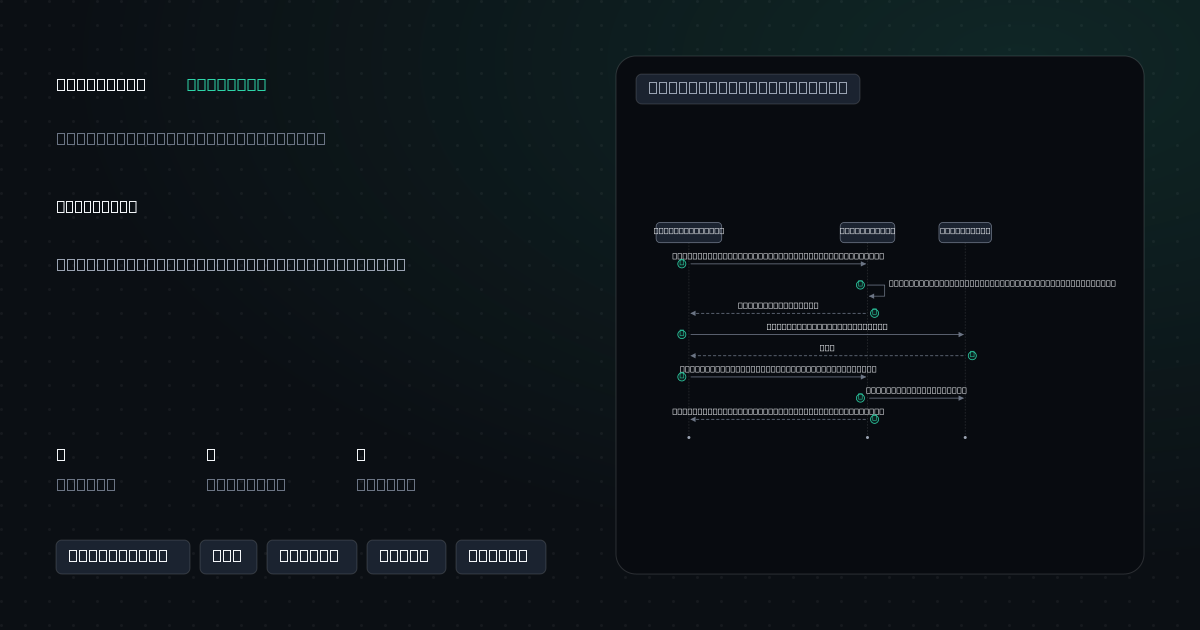
O serviço com a credencial real assina uma URL temporária por objeto, método e prazo; o cliente fala direto com o storage e a credencial nunca sai do servidor.
pattern/security/valet-key
Cenário
Upload do documento de KYC direto ao SeaweedFS; a mesma URL em outro objeto recebe 403.
Planta
Sequência8 passos — reproduza para seguir o fluxo
Como funciona
4passos
O serviço com a credencial real assina uma URL temporária por objeto, método e prazo
Esconde cada passo: lembre antes de tocar para revelar.
Conta da rota ≠ cliente autenticado403 sem assinar
presign de PUT em kyc/<conta>/identity.pdf, TTL 120 s
O SeaweedFS valida assinatura, método, objeto e expiração
Tamanho não travadostat após o upload
Trade-offs
O que se ganha, o que se paga
Vantagens
Bytes não passam pela API
Escopo aplicado pelo storage
Custos
URL não revogável antes do TTL
Upload precisa ser conferido
Código
pattern/security/valet-key
6 arquivos./
src/
Executar com Docker
./docker.shuntil docker exec valet-key-storage wget -qO /dev/null http://localhost:8333/healthz 2>/dev/null && docker exec valet-key-storage wget -qO /dev/null http://localhost:8888/buckets/customer-documents/ 2>/dev/null; do sleep 1; donebun install# dependênciasbun run demo# roda o cenáriodocker rm -f valet-key-storageSaída: URL de PUT por 120s; upload direto ao SeaweedFS → 200; confirmação accepted: true (PDF de 48 bytes); a mesma URL em outro objeto → 403; chave para conta alheia → 403.
Código
src/demo.ts// Demo: the API signs a short-lived PUT URL for one KYC object; the customer uploads straight to the storage, and the storage refuses the URL for any other object.
import { S3Client } from "bun";
import { Elysia } from "elysia";
// The real storage credentials stay in this service; the client only ever sees a signed URL.
const storage = new S3Client({
endpoint: Bun.env.VALET_KEY_S3_ENDPOINT ?? "http://localhost:9000",
bucket: Bun.env.VALET_KEY_S3_BUCKET ?? "customer-documents",
region: "us-east-1",
accessKeyId: Bun.env.VALET_KEY_S3_ACCESS_KEY_ID ?? "valet-issuer",
secretAccessKey: Bun.env.VALET_KEY_S3_SECRET_ACCESS_KEY ?? "valet-issuer-secret",
});
const KYC_UPLOAD_TTL_SECONDS = 120;
const KYC_SIZE_MAX_BYTES = 5 * 1024 * 1024;
const kycKey = (accountId: string) => `kyc/${accountId}/identity.pdf`;
const api = new Elysia()
// The account comes from authentication (here the x-account-id header): no key for someone else's account.
.post("/accounts/:accountId/kyc/upload-url", ({ params, headers, status }) => {
if (headers["x-account-id"] !== params.accountId) return status(403, "not your account");
// presign is local HMAC math: no call to the storage, and the URL is never logged — it is a credential.
return { url: storage.presign(kycKey(params.accountId), { method: "PUT", expiresIn: KYC_UPLOAD_TTL_SECONDS, type: "application/pdf" }), expiresInSeconds: KYC_UPLOAD_TTL_SECONDS };
})
// The signed PUT does not lock size: the API checks the object after the upload.
.post("/accounts/:accountId/kyc/confirm", async ({ params }) => {
const stat = await storage.stat(kycKey(params.accountId));
return { accepted: stat.type === "application/pdf" && stat.size <= KYC_SIZE_MAX_BYTES, size: stat.size, type: stat.type };
});
const ACCOUNT = "0001-7700880";
const apiPost = (path: string, accountId = ACCOUNT) => api.handle(new Request(`http://localhost${path}`, { method: "POST", headers: { "x-account-id": accountId } }));
const { url, expiresInSeconds } = (await (await apiPost(`/accounts/${ACCOUNT}/kyc/upload-url`)).json()) as { url: string; expiresInSeconds: number };
console.log(` [ISSUE] PUT ${kycKey(ACCOUNT)} for ${expiresInSeconds}s`);
const pdf = new Blob([`%PDF-1.7\nidentity document of ${ACCOUNT}\n%%EOF`], { type: "application/pdf" });
console.log(` [CLIENT] PUT straight to storage → ${(await fetch(url, { method: "PUT", body: pdf, headers: { "content-type": "application/pdf" } })).status}`);
console.log(` [CONFIRM] ${await (await apiPost(`/accounts/${ACCOUNT}/kyc/confirm`)).text()}`);
console.log(` [CLIENT] same URL on another account's object → ${(await fetch(url.replace(ACCOUNT, "0002-1234567"), { method: "PUT", body: pdf, headers: { "content-type": "application/pdf" } })).status}`);
console.log(` [ISSUE] key for someone else's account → ${(await apiPost(`/accounts/${ACCOUNT}/kyc/upload-url`, "0002-1234567")).status}`);Nível
introdutório
2/13
Domínio financeiro
Padrões do catálogo que implementa
Infraestrutura
MinIOobject storage S3
bitnamilegacy/minio:2025.7.23:9000
Variáveis de ambiente
Parecidos
Por que se relacionam
Teste rápido
Qual destes combina com Valet Key?
Assina a URL com chave do cofre. Abrir Gerenciamento de Segredos
Seu progresso
0/157 estudados
Fica salvo só neste navegador.