
pattern/security/token-auth
Infraestrutura realintrodutório
- Bun
- Bun RedisClient
- Bun.password
- ElysiaJS
- Redis
- TypeScript
- node:crypto
- Docker
JWT HMAC-SHA256 verificado em qualquer instância sem banco; revogação por jti no Redis com TTL da vida restante. Use em APIs sem sessão no servidor.
pattern/security/token-auth
Cenário
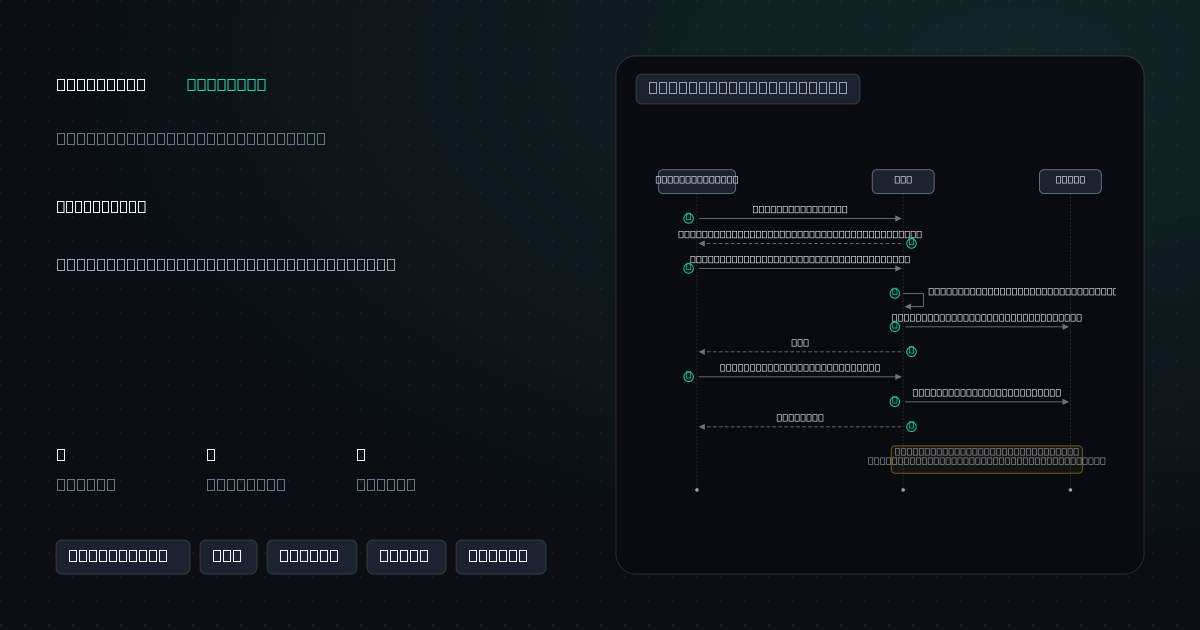
Maria consulta o saldo com o token e faz logout; o mesmo token, ainda válido, passa a ser recusado.
Planta
Sequência10 passos — reproduza para seguir o fluxo
Como funciona
4passos
JWT HMAC-SHA256 verificado em qualquer instância sem banco, com revogação por jti no Redis
Esconde cada passo: lembre antes de tocar para revelar.
Vocabulário compartilhado
header.payload base64url assinado; claims jti, iat, exp
Header exato (barra alg: none) e assinatura com timingSafeEqual
O guard (resolve) protege só as rotas depois dele
Logout grava o jti no Redis com TTL restante
Trade-offs
O que se ganha, o que se paga
Vantagens
Verificação local, sem banco
Payload legível
Custos
Revogação exige ida ao Redis
Nada sensível nos claims; segredo vazado forja tokens
Código
pattern/security/token-auth
6 arquivos./
src/
Executar com Docker
./docker.shuntil docker exec token-auth-cache redis-cli ping >/dev/null 2>&1; do sleep 1; donebun install# dependênciasbun run demo# roda o cenáriodocker rm -f token-auth-cacheSaída: saldo 200 com balanceCents 1523042; logout 200; o mesmo token depois do logout → 401 invalid token.
Código
src/demo.ts// Demo: Maria logs in, reads her balance with a signed JWT, logs out — and the same token is refused through the Redis blacklist.
import { RedisClient } from "bun";
import { createHmac, timingSafeEqual } from "node:crypto";
import { Elysia, t } from "elysia";
type TokenClaims = { sub: string; jti: string; iat: number; exp: number };
const redis = new RedisClient(Bun.env.TOKEN_AUTH_REDIS_URL ?? "redis://localhost:6379");
// Whoever holds this key can mint any token.
const SECRET = Bun.env.TOKEN_AUTH_JWT_SECRET ?? "change-me-to-32-or-more-random-bytes";
const ACCESS_TTL_SECONDS = 15 * 60;
const HEADER = Buffer.from(JSON.stringify({ alg: "HS256", typ: "JWT" })).toString("base64url");
const now = () => Math.floor(Date.now() / 1000);
const hmac = (data: string) => createHmac("sha256", SECRET).update(data).digest();
// The claims are readable by anyone, never encrypted: nothing sensitive goes in them.
function tokenSign(sub: string): string {
const claims: TokenClaims = { sub, jti: crypto.randomUUID(), iat: now(), exp: now() + ACCESS_TTL_SECONDS };
const data = `${HEADER}.${Buffer.from(JSON.stringify(claims)).toString("base64url")}`;
return `${data}.${hmac(data).toString("base64url")}`;
}
// Signature first, in constant time; the header must be ours byte for byte, so "alg: none" is refused.
async function tokenVerify(token: string): Promise<TokenClaims | undefined> {
const [header, payload = "", signature = ""] = token.split(".");
const expected = hmac(`${header}.${payload}`);
const received = Buffer.from(signature, "base64url");
if (header !== HEADER || received.length !== expected.length || !timingSafeEqual(received, expected)) return undefined;
const claims = JSON.parse(Buffer.from(payload, "base64url").toString()) as TokenClaims;
// A revoked jti lives in Redis only as long as the token would.
return claims.exp > now() && (await redis.exists(`bl:${claims.jti}`)) === false ? claims : undefined;
}
const api = new Elysia()
.post("/auth/login", async ({ body, status }) => {
const passwordHash = await redis.get(`user:${body.email}`);
return passwordHash && (await Bun.password.verify(body.password, passwordHash)) ? { accessToken: tokenSign(body.email) } : status(401, "invalid credentials");
}, { body: t.Object({ email: t.String(), password: t.String() }) })
// The guard applies only to routes registered after it: login stays open.
.resolve({ as: "scoped" }, async ({ headers, status }) => {
const claims = await tokenVerify(headers.authorization?.replace(/^Bearer /, "") ?? "");
return claims ? { claims } : status(401, "invalid token");
})
.get("/accounts/balance", ({ claims }) => ({ owner: claims.sub, balanceCents: 1_523_042 }))
.post("/auth/logout", async ({ claims }) => {
await redis.send("SET", [`bl:${claims.jti}`, "1", "EX", String(Math.max(1, claims.exp - now()))]);
return { loggedOut: true };
});
await redis.set("user:maria@banco.com", await Bun.password.hash("Senha@Forte123", { algorithm: "argon2id" }));
const apiCall = (method: string, path: string, init: { token?: string; body?: object } = {}) =>
api.handle(new Request(`http://localhost${path}`, { method, headers: { "content-type": "application/json", ...(init.token ? { authorization: `Bearer ${init.token}` } : {}) }, body: init.body && JSON.stringify(init.body) }));
const { accessToken } = (await (await apiCall("POST", "/auth/login", { body: { email: "maria@banco.com", password: "Senha@Forte123" } })).json()) as { accessToken: string };
for (const [label, method, path] of [["balance", "GET", "/accounts/balance"], ["logout", "POST", "/auth/logout"], ["balance after logout", "GET", "/accounts/balance"]] as const) {
const response = await apiCall(method, path, { token: accessToken });
console.log(` [${label}] ${response.status} ${await response.text()}`);
}
redis.close();Nível
introdutório
3/13
Domínio financeiro
Padrões do catálogo que implementa
Infraestrutura
Rediscache / estrutura de dados
redis:7-alpine:6379
Variáveis de ambiente
Trilhapasso 2 de 6
Segurança de API bancária
Parecidos
Relações
Onde ele se encaixa
Por que se relacionam
Vem antes
Próximo passo
Teste rápido
Qual é o próximo passo depois de Token Auth?
Delega o login ao provedor. Abrir Federated Identity
Seu progresso
0/157 estudados
Fica salvo só neste navegador.