
pattern/security/secrets-management
Infraestrutura realintrodutório
- Bun
- HashiCorp Vault
- TypeScript
- node:crypto
- Docker
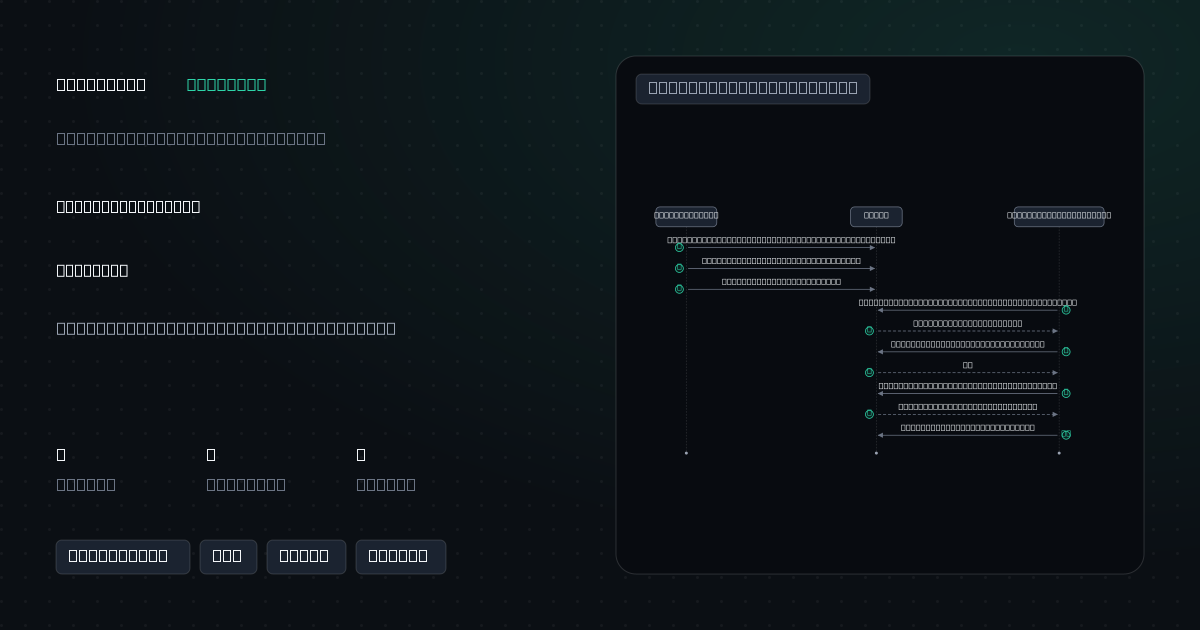
Credenciais centralizadas no HashiCorp Vault: cada serviço se autentica com a própria identidade, recebe token curto e lê só o que sua política permite.
pattern/security/secrets-management
Cenário
Pagamentos lê a credencial do PIX e recebe 403 na do data warehouse de relatórios.
Planta
Sequência9 passos — reproduza para seguir o fluxo
Como funciona
4passos
Credenciais centralizadas no HashiCorp Vault, com token curto e política por serviço
Esconde cada passo: lembre antes de tocar para revelar.
AppRole, política por serviço (só read no próprio caminho) e token_ttl
Login com role_id e secret_id devolve token com lease
Fora da política403
A aplicação loga só caminho e formato mascarado
Trade-offs
O que se ganha, o que se paga
Vantagens
Rotação e auditoria num lugar
Política e token curto limitam vazamento
Custos
Vault fora = serviços não sobem
secret_id ainda precisa chegar com segurança
Código
pattern/security/secrets-management
6 arquivos./
src/
Executar com Docker
./docker.shuntil docker exec -e VAULT_ADDR=http://127.0.0.1:8200 secrets-management-vault vault status >/dev/null 2>&1; do sleep 1; donebun install# dependênciasbun run demo# roda o cenáriodocker rm -f secrets-management-vaultSaída: login com lease de 30s; payments/pix-db lida com valores mascarados (svc…); reports/warehouse-db → 403.
Código
src/demo.ts// Demo: the payments service logs in to Vault with its AppRole, reads its PIX database credential and is refused the reports one.
import { randomUUID } from "node:crypto";
const VAULT_URL = Bun.env.SECRETS_MANAGEMENT_VAULT_URL ?? "http://localhost:8200";
// The admin token only sets things up; services never use it.
const ADMIN_TOKEN = Bun.env.SECRETS_MANAGEMENT_VAULT_ADMIN_TOKEN ?? "dev-root-token";
const PAYMENTS_TOKEN_TTL = "30s";
async function vaultCall<T>(token: string, method: string, path: string, body?: unknown): Promise<T> {
const response = await fetch(`${VAULT_URL}/v1/${path}`, { method, headers: { "x-vault-token": token, "content-type": "application/json" }, body: body === undefined ? undefined : JSON.stringify(body) });
// Vault's error names the path, never the secret value; the value itself is never logged here.
if (!response.ok) throw new Error(`${method} ${path}: ${response.status}`);
return (response.status === 204 ? undefined : await response.json()) as T;
}
// Setup with the admin token: AppRole auth, a policy that reads only payments/*, a role with a short-lived token, the secrets.
await vaultCall(ADMIN_TOKEN, "POST", "sys/auth/approle", { type: "approle" }).catch(() => undefined);
await vaultCall(ADMIN_TOKEN, "PUT", "sys/policies/acl/payments", { policy: `path "secret/data/payments/*" { capabilities = ["read"] }` });
await vaultCall(ADMIN_TOKEN, "POST", "auth/approle/role/payments", { token_policies: ["payments"], token_ttl: PAYMENTS_TOKEN_TTL, token_max_ttl: PAYMENTS_TOKEN_TTL });
await vaultCall(ADMIN_TOKEN, "POST", "secret/data/payments/pix-db", { data: { username: "svc_payments", password: randomUUID() } });
await vaultCall(ADMIN_TOKEN, "POST", "secret/data/reports/warehouse-db", { data: { username: "svc_reports", password: randomUUID() } });
const { data: role } = await vaultCall<{ data: { role_id: string } }>(ADMIN_TOKEN, "GET", "auth/approle/role/payments/role-id");
const { data: secret } = await vaultCall<{ data: { secret_id: string } }>(ADMIN_TOKEN, "POST", "auth/approle/role/payments/secret-id", {});
// The service authenticates with its own identity and gets a token whose lease bounds the exposure window.
const { auth } = await vaultCall<{ auth: { client_token: string; lease_duration: number } }>("", "POST", "auth/approle/login", { role_id: role.role_id, secret_id: secret.secret_id });
console.log(` [PAYMENTS] logged in, token lease ${auth.lease_duration}s`);
for (const path of ["payments/pix-db", "reports/warehouse-db"]) {
const outcome = await vaultCall<{ data: { data: Record<string, string> } }>(auth.client_token, "GET", `secret/data/${path}`).then(
// Only the shape is printed; the value is masked to prove it was read without ever logging it.
({ data }) => `read ${JSON.stringify(Object.fromEntries(Object.entries(data.data).map(([key, value]) => [key, `${value.slice(0, 3)}…`])))}`,
(error: Error) => error.message,
);
console.log(` [PAYMENTS] ${path.padEnd(22)} → ${outcome}`);
}Nível
introdutório
2/13
Domínio financeiro
Padrões do catálogo que implementa
Infraestrutura
HashiCorp Vaultcofre de segredos
hashicorp/vault:1.17:8200
Variáveis de ambiente
Trilhapasso 5 de 6
Segurança de API bancária
Por que se relacionam
Teste rápido
Qual destes combina com Gerenciamento de Segredos?
Assina a URL com chave do cofre. Abrir Valet Key
Seu progresso
0/157 estudados
Fica salvo só neste navegador.