
pattern/resilience/rate-limiting
Infraestrutura realintrodutório
- Bun
- Bun RedisClient
- ElysiaJS
- Redis
- TypeScript
- Docker
Limita requisições por cliente numa janela, com estado no Redis compartilhado pelas réplicas; responde 429 com Retry-After.
pattern/resilience/rate-limiting
Cenário
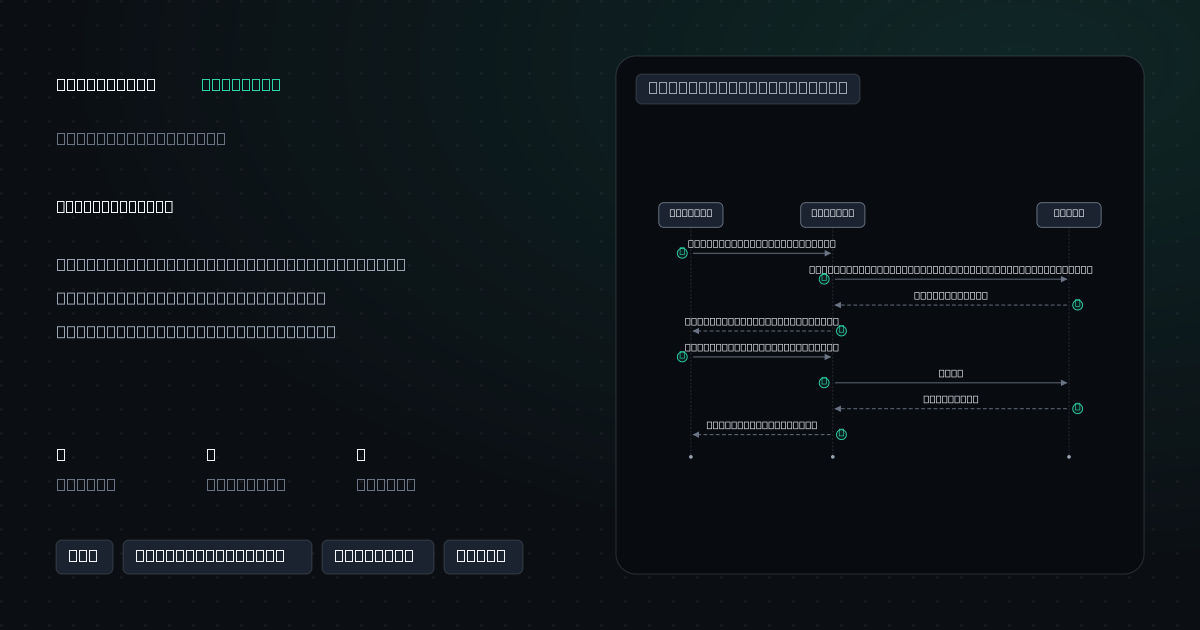
10 PIX por minuto por conta (não por IP); 12 em rajada: 10 passam, 2 recebem 429.
Planta
Sequência8 passos — reproduza para seguir o fluxo
Como funciona
4passos
Limita requisições por cliente numa janela, com estado no Redis compartilhado pelas réplicas
Esconde cada passo: lembre antes de tocar para revelar.
Lua remove o expirado, conta e registra atomicamente
Sorted set por timestampJanela deslizante, sem furo de 2×
Bloqueada não é registrada
RateLimit-Remaining sempre; Retry-After no 429
Trade-offs
O que se ganha, o que se paga
Vantagens
Limite vale para a frota
Sem dobro na virada da janela
Custos
Ida ao Redis por requisição
Uma entrada por requisição
Código
pattern/resilience/rate-limiting
6 arquivos./
src/
Executar com Docker
./docker.shuntil docker exec rate-limiting-cache redis-cli ping >/dev/null 2>&1; do sleep 1; donebun install# dependênciasbun run demo# roda o cenáriodocker rm -f rate-limiting-cacheSaída: PIX 1 a 10 com 201 e remaining de 9 a 0; PIX 11 e 12 com 429 e retry-after=60s.
Código
src/demo.ts// Demo: one account bursts 12 PIX against a limit of 10 per minute, enforced by a sliding window in Redis.
import { RedisClient } from "bun";
import { Elysia, t } from "elysia";
const redis = new RedisClient(Bun.env.RATE_LIMITING_REDIS_URL ?? "redis://localhost:6379");
const PIX_LIMIT = 10;
const WINDOW_MS = 60_000;
// Prune what is older than the window, count and record in one atomic step: two replicas can never both let the last
// request of the quota through. A blocked request is not recorded, so insisting does not extend the block.
const WINDOW_SCRIPT = `
redis.call('ZREMRANGEBYSCORE', KEYS[1], 0, tonumber(ARGV[1]) - tonumber(ARGV[2]))
local total = redis.call('ZCARD', KEYS[1])
if total >= tonumber(ARGV[3]) then
return {0, total, tonumber(redis.call('ZRANGE', KEYS[1], 0, 0, 'WITHSCORES')[2]) + tonumber(ARGV[2])}
end
redis.call('ZADD', KEYS[1], ARGV[1], ARGV[4])
redis.call('PEXPIRE', KEYS[1], ARGV[2])
return {1, total + 1, tonumber(redis.call('ZRANGE', KEYS[1], 0, 0, 'WITHSCORES')[2]) + tonumber(ARGV[2])}`;
async function limitCount(key: string): Promise<{ ok: boolean; remaining: number; resetAt: number }> {
const now = Date.now();
const [ok, used, resetAt] = (await redis.send("EVAL", [WINDOW_SCRIPT, "1", key, String(now), String(WINDOW_MS), String(PIX_LIMIT), `${now}-${crypto.randomUUID()}`])) as [number, number, number];
return { ok: ok === 1, remaining: Math.max(0, PIX_LIMIT - used), resetAt };
}
// The key is the account, never the IP: a whole office goes out through one IP.
const api = new Elysia().post("/pix", async ({ headers, body, set, status }) => {
const result = await limitCount(`rl:pix:${headers["x-account-id"]}`);
set.headers["ratelimit-remaining"] = String(result.remaining);
if (!result.ok) {
set.headers["retry-after"] = String(Math.max(1, Math.ceil((result.resetAt - Date.now()) / 1_000)));
return status(429, "too many requests");
}
return status(201, { pixKey: body.pixKey, status: "accepted" });
}, { body: t.Object({ pixKey: t.String(), amountCents: t.Integer({ minimum: 1 }) }) });
await redis.del("rl:pix:acc-42");
for (let index = 1; index <= 12; index++) {
const response = await api.handle(new Request("http://localhost/pix", { method: "POST", headers: { "content-type": "application/json", "x-account-id": "acc-42" }, body: JSON.stringify({ pixKey: "maria@banco.com", amountCents: 5_000 }) }));
console.log(` [PIX ${String(index).padStart(2)}] ${response.status} remaining=${response.headers.get("ratelimit-remaining")}${response.headers.get("retry-after") ? ` retry-after=${response.headers.get("retry-after")}s` : ""}`);
}
redis.close();Nível
introdutório
3/13
Domínio financeiro
Padrões do catálogo que implementa
Infraestrutura
Rediscache / estrutura de dados
redis:7-alpine:6379
Variáveis de ambiente
Parecidos
Por que se relacionam
Próximo passo
Teste rápido
Qual é o próximo passo depois de Rate Limiting?
Limita também o que você chama. Abrir Throttling
Seu progresso
0/157 estudados
Fica salvo só neste navegador.