

pattern/architecture/layered-n-tier
Arquitetura em Camadas (N-Tier)
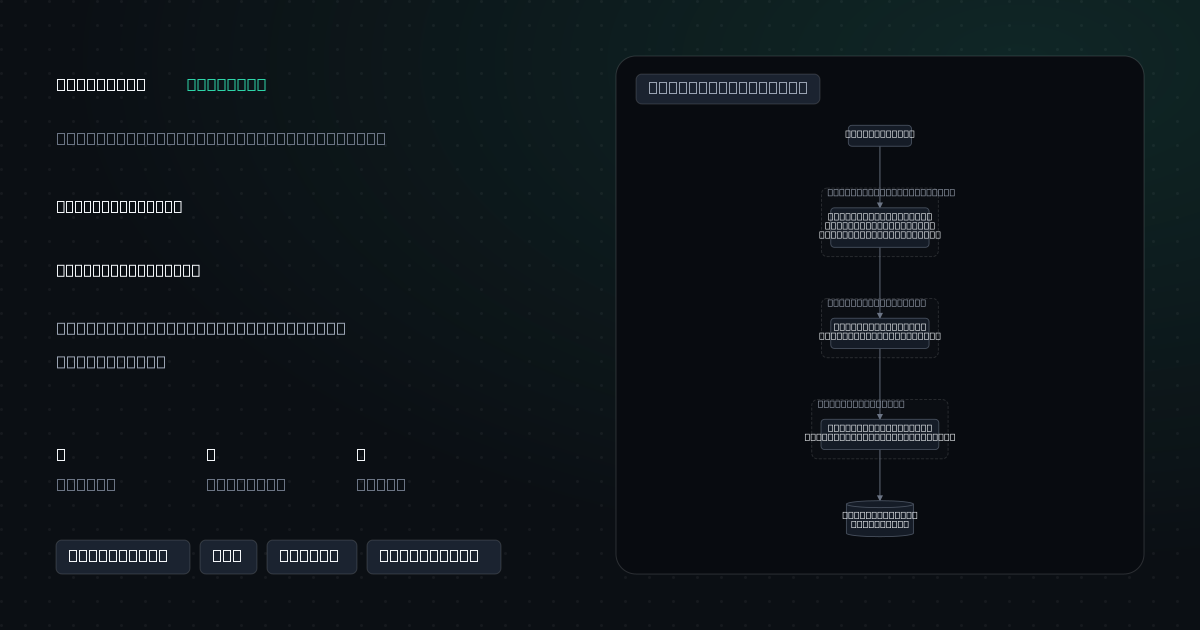
Camadas horizontais (apresentação, negócio, dados), cada uma chamando só a de baixo; os dados rodam num tier próprio, o PostgreSQL.
- passos
- 4
- arquivos
- 7
- testes
- 0
- tecnologias
- 6
Cenário
Transferência de R$ 4.000,00 com limite de R$ 50.000,00 e saldo; controller nunca faz query, dados nunca decidem regra.
Planta
Fluxo4/4
4
4 passos — reproduza para seguir o fluxo
- chamada
- resposta ou assíncrono
- falha
- passo
- toque num nó para focar
- Outras plantas de fluxo
Como funciona
4passos
Camadas horizontais (apresentação, negócio, dados), cada uma chamando só a de baixo
0/4 revelados
Esconde cada passo: lembre antes de tocar para revelar.
Vocabulário compartilhado
- 1
Apresentação valida o corpo e chama o negócio
- 2
Negócio aplica limite e saldo e define a transação
- 3
Dados travam as contas com
FOR UPDATEem ordem de id - 4
Apresentação formata o saldo em reais
Trade-offs
O que se ganha, o que se paga
Vantagens
Separação clara e familiar
Trocar o banco mexe só nos dados
Custos
Leitura simples atravessa todas as camadas
Feature nova muda todas as camadas
Código
pattern/architecture/layered-n-tier
7 arquivos./
- .env.exampleinfra
- docker.shinfra
- package.jsoninfra
- README.md
- tsconfig.jsoninfra
sql/
- 01_schema.sqlschema
src/
- demo.tsdemo
Executar com Docker
./docker.shuntil docker exec layered-n-tier-db pg_isready -h 127.0.0.1 -U postgres >/dev/null 2>&1; do sleep 1; donebun install# dependênciasbun run demo# roda o cenáriodocker rm -f layered-n-tier-db
Saída: 201 com sourceBalance R$ 14.000,00.
- Requisitos
- BunDocker
- Sobe junto
- PostgreSQL
Código
src/demo.ts
// Demo: a transfer enters through the presentation layer and descends business → data → PostgreSQL; no layer skips the one below.
import { Elysia, t } from "elysia";
import pg from "pg";

const pool = new pg.Pool({ connectionString: Bun.env.LAYERED_N_TIER_DATABASE_URL ?? "postgres://postgres:postgres@localhost:5432/layered_n_tier_db" });

// Data layer: the only code that speaks SQL; owns the transaction mechanics, decides no rule.
async function accountsTransaction<T>(ids: string[], work: (balances: Map<string, number>, balanceUpdate: (id: string, cents: number) => Promise<void>) => Promise<T>): Promise<T> {
  const client = await pool.connect();
  try {
    await client.query("BEGIN");
    // Rows locked in id order: two opposite transfers between the same accounts cannot deadlock.
    const { rows } = await client.query<{ id: string; balance_cents: string }>("SELECT id, balance_cents FROM accounts WHERE id = ANY($1) ORDER BY id FOR UPDATE", [ids]);
    const result = await work(new Map(rows.map((row) => [row.id, Number(row.balance_cents)])), async (id, cents) => void (await client.query("UPDATE accounts SET balance_cents = $2 WHERE id = $1", [id, cents])));
    await client.query("COMMIT");
    return result;
  } catch (error) {
    await client.query("ROLLBACK");
    throw error;
  } finally {
    client.release();
  }
}

// Business layer: the bank's rules; calls only the data layer.
const TRANSFER_LIMIT_CENTS = 5_000_000;
function serviceTransfer(sourceId: string, destinationId: string, amountCents: number): Promise<number> {
  if (amountCents > TRANSFER_LIMIT_CENTS) throw new Error("transfer above the R$ 50,000.00 limit");
  return accountsTransaction([sourceId, destinationId], async (balances, balanceUpdate) => {
    const source = balances.get(sourceId)!;
    if (source < amountCents) throw new Error(`balance ${source} cents below ${amountCents}`);
    await balanceUpdate(sourceId, source - amountCents);
    await balanceUpdate(destinationId, balances.get(destinationId)! + amountCents);
    return source - amountCents;
  });
}

// Presentation layer: HTTP in, formatted JSON out; calls only the business layer — never a query, never a rule.
const brl = (cents: number) => `R$ ${(cents / 100).toLocaleString("pt-BR", { minimumFractionDigits: 2 })}`;
const app = new Elysia().post(
  "/transfers",
  async ({ body, status }) => status(201, { sourceBalance: brl(await serviceTransfer(body.sourceAccountId, body.destinationAccountId, body.amountCents)) }),
  { body: t.Object({ sourceAccountId: t.String(), destinationAccountId: t.String(), amountCents: t.Integer({ minimum: 1 }) }) },
);

const suffix = Date.now().toString(36).toUpperCase();
await pool.query("INSERT INTO accounts (id, holder_name, balance_cents) VALUES ($1, 'Alice Ferreira', 1800000), ($2, 'Bruno Martins', 650000)", [`CC-A-${suffix}`, `CC-B-${suffix}`]);
const response = await app.handle(new Request("http://localhost/transfers", { method: "POST", headers: { "content-type": "application/json" }, body: JSON.stringify({ sourceAccountId: `CC-A-${suffix}`, destinationAccountId: `CC-B-${suffix}`, amountCents: 400_000 }) }));
console.log(`  [PRESENTATION] R$ 4000.00 Alice → Bruno → ${response.status} ${await response.text()}`);
await pool.end();
Nível
intermediário
4/13
- Linhas de TypeScript
- 45
- Tipo
- B — um serviço (docker.sh)
Domínio financeiro
- Conta corrente
- Saldo
- Limite
Padrões do catálogo que implementa
Infraestrutura
PostgreSQLbanco relacional
postgres:16-alpine:5432
Banco
sql/01_schema.sql
- accounts
Variáveis de ambiente
- LAYERED_N_TIER_DATABASE_URL
- postgres://postgres:postgres@localhost:5432/layered_n_tier_db
- PostgreSQL of the data tier.
Parecidos
Relações
Onde ele se encaixa
- Arquitetura em Camadas
- próximo passoClean Architecture
- Próximo passo1
- Combina com1
- Alternativa a1
Por que se relacionam
Teste rápido
Qual é o próximo passo depois de Arquitetura em Camadas?
Inverte a dependência para o domínio. Abrir Clean Architecture
Seu progresso
0/157 estudados
Fica salvo só neste navegador.